


What is Revit Software: Complete Beginner’s Guide
Updated on : 22 AUGUST, 2025
Image Source: autodesk.com
Table Of Contents

- 1. Introduction
- 2. What is Revit Software?
- 3. Core Features Overview
- 4. 3D Modeling and Visualization
- 5. BIM and Collaboration
- 6. Revit for Architecture
- 7. Revit for Structural Engineering
- 8. Revit for MEP (Mechanical, Electrical, Plumbing)
- 9. User Experience and Interface
- 10. Pricing and Plans
- 11. Use Cases and Industry Applications
- 12. Comparison with Other BIM Tools
- 13. Strengths and Limitations
- 14. Who Should Use Revit?
- 15. Getting Started
- 16. FAQs
Table Of Contents

Introduction
Revit by Autodesk is a Building Information Modeling (BIM) software widely used in the architecture, engineering, and construction (AEC) industries. It allows users to design buildings and infrastructure in 3D, collaborate in real-time, and generate detailed construction documents automatically.
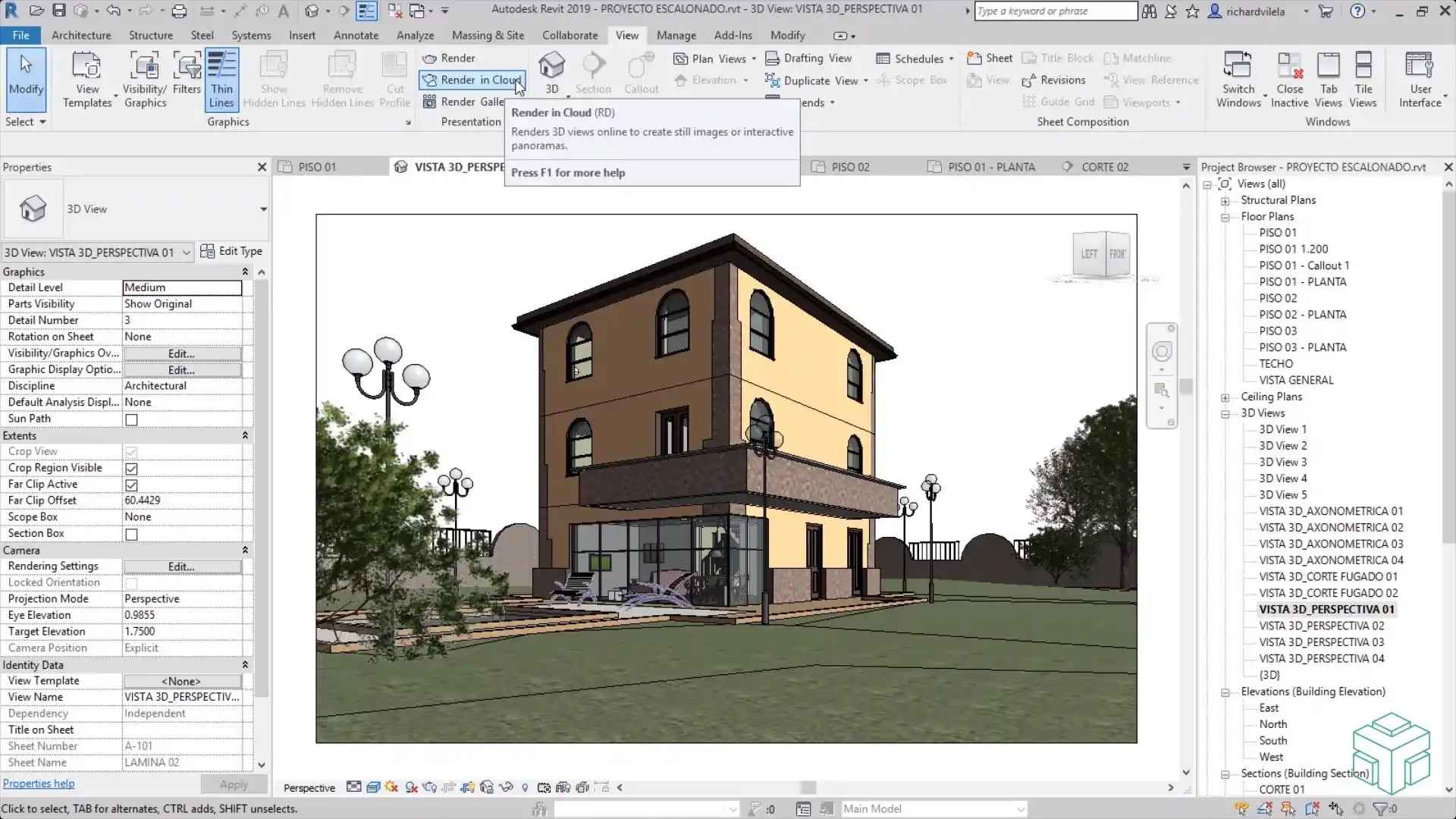
Image Source: autodesk.com
What is Revit Software?
Revit is a BIM software that enables multidisciplinary collaboration between architects, civil engineers, structural engineers, and contractors. Unlike traditional CAD tools, Revit creates intelligent models with real-world data that help in planning, analysis, visualization, and construction.
Revit is not just design software—it’s a full ecosystem for managing building lifecycles.
| Functionality | Description |
|---|---|
| 3D Modeling | Design buildings and infrastructure with parametric components. |
| BIM Collaboration | Work on the same project with architects, engineers, and contractors. |
| Construction Documentation | Automatically generate floor plans, elevations, and sections. |
| MEP Design | Create mechanical, electrical, and plumbing systems with accuracy. |
| Structural Design | Build and analyze structural frameworks for stability. |
| Visualization | Render photorealistic models for presentations and approvals. |
For CAD/BIM Solutions with Hexadecimal Software
Empower your projects with cutting-edge CAD & BIM services from Hexadecimal Software.
Core Features Overview
Revit is more than drafting software—it’s a comprehensive BIM ecosystem. Its features help professionals manage every stage of a construction project.
| Feature | Benefit |
|---|---|
| Parametric Components | Smart 3D elements that update across all views. |
| Worksharing | Multiple users collaborate on one project file in real-time. |
| Schedules & Quantities | Automatically extract material lists and quantities. |
| Cloud Collaboration | Access projects anytime via Autodesk BIM 360. |
| Visualization | High-quality renderings and walkthroughs for clients. |
3D Modeling and Visualization
Revit allows users to create parametric 3D models of buildings and infrastructure. Every element is data-rich and interconnected, so changes in one view automatically reflect in all others.
| Step | Action |
|---|---|
| 1 | Start with a project template (architecture, structural, or MEP). |
| 2 | Use parametric components like walls, doors, and windows. |
| 3 | Apply materials and textures for realism. |
| 4 | Generate 3D views and walkthroughs. |
BIM and Collaboration
Revit is built for collaboration. Teams can work on a central model simultaneously, ensuring accuracy and reducing conflicts.
| Collaboration Type | How It Works |
|---|---|
| Worksharing | Multiple users edit the same project in real time. |
| BIM 360 Cloud | Collaborate across offices or sites using the cloud. |
| Clash Detection | Identify design conflicts before construction. |

Need advanced CAD/BIM solutions for your projects?

Revit for Architecture
Revit empowers architects with tools for conceptual design, floor plans, elevations, and 3D visualization.
| Architectural Feature | Use Case |
|---|---|
| Conceptual Design | Sketch massing models and refine forms. |
| Detailed Modeling | Add walls, doors, windows, and roofs. |
| Renderings | Produce realistic images for presentations. |
| Documentation | Automatically generate sheets and schedules. |
Revit for Structural Engineering
Structural engineers can design, analyze, and document building frameworks.
| Structural Feature | Use Case |
|---|---|
| Steel & Concrete Models | Design beams, columns, and slabs. |
| Structural Analysis | Check loads and stability. |
| Reinforcement Tools | Add rebars and structural connections. |
| Construction Docs | Produce detailed structural drawings. |
You Might Also Like

Quality Assurance vs Quality Control: Key Differences Explained
By Hexadecimal Software Team
on 2025-04-14

Steps in SDLC Life Cycle: Plan, Analyze, Design, Build, Test
By Hexadecimal Software Team
on 2025-04-16

Smoke vs Sanity Testing: Basic Check vs Specific Check
By Hexadecimal Software Team
on 2025-05-01
Revit for MEP (Mechanical, Electrical, Plumbing)
Revit provides specialized tools for MEP engineers to design building systems.
| MEP Feature | Use Case |
|---|---|
| HVAC Systems | Design ducts, air terminals, and mechanical layouts. |
| Electrical Systems | Place lighting fixtures, panels, and circuits. |
| Plumbing Systems | Design piping layouts and water systems. |
| Coordination | Avoid clashes between MEP and structural elements. |
User Experience and Interface
Revit’s interface is designed for professionals but beginner-friendly with tool ribbons, property panels, and view controls.
| UI Feature | User Benefit |
|---|---|
| Ribbon Interface | Quick access to modeling tools. |
| Properties Panel | Easily modify component parameters. |
| Project Browser | Navigate views, sheets, and families. |
| View Controls | Switch between 2D, 3D, and render views. |
Pricing and Plans
Autodesk Revit offers subscription-based pricing depending on usage and team size.
| Plan | Monthly Price | Yearly Price | Features |
|---|---|---|---|
| Revit LT | $60 | $495 | Basic 3D modeling, limited collaboration |
| Revit Full | $345 | $2,765 | Full BIM suite with collaboration |
| AEC Collection | $430 | $3,430 | Revit + AutoCAD + Civil 3D + Navisworks |
Use Cases and Industry Applications
Revit is used across the AEC industry for efficient project design and delivery.
| User Type | Application |
|---|---|
| Architects | Design residential, commercial, and industrial buildings. |
| Civil Engineers | Plan infrastructure and construction projects. |
| Structural Engineers | Analyze and document structural systems. |
| MEP Engineers | Coordinate building services and systems. |
| Contractors | Use BIM models for project execution. |
Comparison with Other BIM Tools
| Platform | 3D Modeling | BIM Collaboration | MEP Tools | Ease of Use |
|---|---|---|---|---|
| Revit | Yes | Yes | Yes | Moderate |
| AutoCAD | Limited (2D/3D) | No | No | Easy |
| ArchiCAD | Yes | Yes | Limited | Easy |
| SketchUp | Yes | No | No | Very Easy |
Strengths and Limitations
| Strengths | Limitations |
|---|---|
| Comprehensive BIM platform | Steeper learning curve for beginners |
| Multi-disciplinary collaboration | High subscription cost |
| Automated documentation | Requires powerful hardware |
| Strong industry adoption | Complex for small projects |
For Engineering & Construction IT Services
Empower your AEC business with custom engineering and BIM solutions at Hexadecimal Software.
Who Should Use Revit?
Revit is designed for AEC professionals and students who need to work with BIM projects.
| User Profile | Why Revit is Ideal |
|---|---|
| Architects | Conceptual design, modeling, and visualization. |
| Civil Engineers | Plan and coordinate infrastructure projects. |
| Structural Engineers | Analyze frameworks and create drawings. |
| MEP Engineers | Design HVAC, electrical, and plumbing systems. |
| Contractors | Use BIM models for execution and costing. |

Need help implementing Revit or BIM workflows for your company?
Getting Started
Getting started with Revit is simple. You can download a trial from Autodesk, explore templates, and begin creating BIM models.
| Step | Action |
|---|---|
| 1 | Download and install Revit from Autodesk website. |
| 2 | Start a new project (Architecture, Structure, or MEP). |
| 3 | Use parametric families to build your model. |
| 4 | Generate views: plans, sections, and 3D renders. |
| 5 | Collaborate with your team using BIM 360. |
| 6 | Export documentation and presentations. |
FAQs
Q1: What is Revit mainly used for?
A: Revit is primarily used for Building Information Modeling (BIM), helping professionals design, visualize, and document construction projects.
Q2: Is Revit the same as AutoCAD?
A: No, AutoCAD is mainly 2D/3D drafting software, while Revit is a BIM tool with intelligent parametric modeling and collaboration.
Q3: Can I use Revit for free?
A: Autodesk offers a 30-day free trial and free student versions.
Q4: Does Revit support teamwork?
A: Yes, multiple users can collaborate on the same central model in real-time.
Q5: What industries use Revit?
A: Architecture, civil engineering, structural engineering, MEP design, and construction.



Buy, Sell & Rent Properties – Download HexaHome App Now!

Find your perfect home, PG, or rental in just a few clicks.

Post your property at ₹0 cost and get genuine buyers & tenants fast.

Smart alerts & search helps you find homes that fit your budget.
Available on iOS & Android


Available on iOS & Android

Scan to Download our App
Available on iOS & Android – Download Now!

A Product By Hexadecimal Software Pvt. Ltd.