


Black Box vs White Box Testing: Software Engineering
Updated on : 28 April 2025

Image Source: google.com
Table Of Contents

- 1. Intoduction
- 2. Introduction to Black Box Testing
- 3. Fundamentals of White Box Testing
- 4. Key Differences Between Black Box vs White Box Testing
- 5. Core Testing Techniques and Methodologies
- 6. Designing Effective Test Cases
- 7. Integrating Testing into Software Development Life Cycle (SDLC)
- 8. Automation in Testing: Black Box vs White Box Strategies
- 9. Black Box vs White Box Testing in Cybersecurity Context
- 10. Selecting the Appropriate Testing Approach
- 11. Advanced Testing Types and Their Applications
- 12. Best Practices for Effective Software Testing
- 13. FAQs
Table Of Contents

Intoduction
🔍 In software engineering Black Box vs White Box testing, Black Box testing checks what a system does without peeking inside, while White Box testing explores how it works behind the scenes! 🖥️🎯 Mastering both ensures better quality, security, and performance. 🚀
Introduction to Black Box Testing
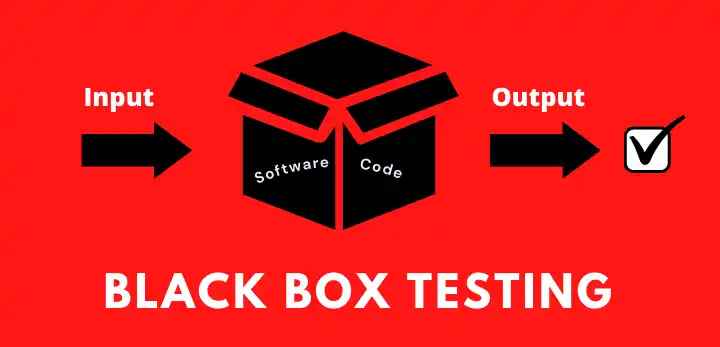
Image Source: google
Black Box Testing is a software testing method where the internal structure or workings of the application are not known to the tester. Focus is purely on inputs and expected outputs.
- ✅ Tester does not need programming knowledge.
- 🎯 Focus is on what the software does, not how it does it.
- 🛠️ Tests are based on requirements and specifications.
- 🔍 Main goal: Identify incorrect or missing functionality.
- 🧪 Common types: Functional Testing, System Testing, Acceptance Testing.
- 📦 The system is treated as a "black box" — only inputs and outputs matter.
Fundamentals of White Box Testing
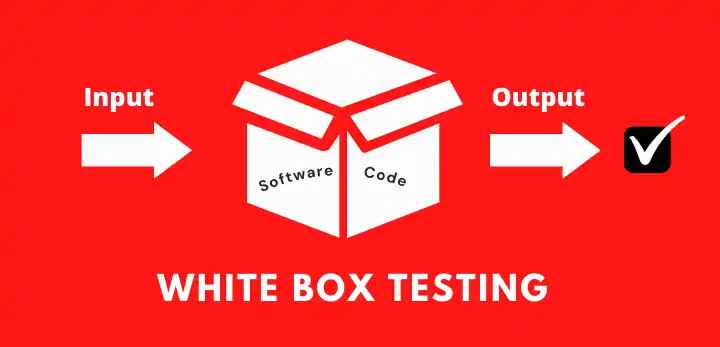
Image Source: google
White Box Testing, also called Clear Box or Structural Testing, focuses on testing the internal workings of a system with full knowledge of the source code.
-
Internal Focus 🔍: Tests the code's structure and logic.
-
Source Code Access 🔑: Tester has full access to the code.
- Techniques:
- Statement Coverage: Tests every line of code 📝.
- Branch Coverage: Tests every decision point 🔀.
- Path Coverage: Tests all possible code paths 🛤️.
- Types:
- Unit Testing: Testing individual components ⚙️.
- Integration Testing: Testing combined modules 🔗.
- Advantages:
- Better code coverage ✅.
- Helps find hidden bugs 🐞.
- Disadvantages:
- Time-consuming ⏳.
- Requires code knowledge 📚.
Key Differences Between Black Box vs White Box Testing
| 🎯 Aspect | ⚡ Black Box Testing | 🛡️ White Box Testing |
|---|---|---|
| Knowledge of Code | No access to source code | Full access to source code |
| Focus Area | Functionality of the software | Internal structure and logic |
| Tester Requirement | No coding knowledge needed | Requires coding knowledge |
| Testing Basis | Requirements and specifications | Code, paths, and logic |
| Techniques Used | Equivalence Partitioning, Boundary Value Analysis | Statement, Branch, and Path Coverage |
| Main Objective | Validate output against inputs | Verify flow and working of internal code |
| Suitable For | Acceptance and system testing | Unit and integration testing |

Your Partner in Quality Assurance and Testing

Core Testing Techniques and Methodologies
| 🛠️ Technique/Methodology | 📝 Description |
|---|---|
| Black Box Testing | Testing based on inputs and outputs without looking into the internal code |
| White Box Testing | Testing internal structures, logic, and code paths |
| Grey Box Testing | Combination of Black and White Box Testing with partial knowledge of internal workings |
| Unit Testing | Testing individual units or components of software |
| Integration Testing | Testing the interaction between integrated modules |
| System Testing | Testing the complete and integrated software system |
| Acceptance Testing | Verifying if the system meets business requirements and is ready for delivery |
| Regression Testing | Re-testing after changes to ensure old functionality still works |
| Performance Testing | Testing the speed, responsiveness, and stability under load |
| Security Testing | Testing the system’s ability to protect against threats and vulnerabilities |
Reliable API Automation Testing Services for Quality Assurance
Designing Effective Test Cases
Image Source: google
| 🧠 Principle | 📝 Description |
|---|---|
| Clear Objective 🎯 | Each test case should have a specific goal or expected result |
| Simple and Precise ✍️ | Keep the test steps straightforward and easy to understand |
| Traceable 🔗 | Each test should link back to a requirement |
| Reusable 🔄 | Design test cases that can be used in multiple test cycles |
| Independent 🔓 | Test cases should not depend on each other to execute |
| Cover Positive and Negative Scenarios ⚖️ | Test both valid (positive) and invalid (negative) conditions |
| Prioritize High-Risk Areas 🚨 | Focus on parts of the system where failure would have serious consequences |
| Use Realistic Data 🗂️ | Test with data that reflects real-world use |

Need a Expert Tester ? For Your Software
Integrating Testing into Software Development Life Cycle (SDLC)
1. Requirement Analysis Phase 📋
- Understand and analyze client requirements.
- Begin preparing test plans and test scenarios early.
- Perform requirement validation to ensure they are complete, clear, and testable.
2. Design Phase 🛠️
- Review system design documents.
- Prepare high-level test cases based on design specs.
- Identify areas needing special testing (like security, performance).
- Plan integration testing strategy.
3. Development Phase 👨💻
- Start unit testing on code modules.
- Use White Box Testing techniques (like statement or branch coverage).
- Perform code reviews and static analysis to detect early defects.
4. Testing Phase 🧪
- Execute test cases prepared earlier.
- Conduct:
- Functional testing (checking features)
- Regression testing (checking old functionality)
- Performance testing (checking speed, load handling)
- Log bugs and work closely with developers for quick fixes.
5. Deployment Phase 🚀
- Perform final acceptance testing (User Acceptance Testing - UAT).
- Validate installation procedures.
- Ensure software is ready for real-world use without issues.
6. Maintenance Phase 🔧
- After deployment, continuously test updates and patches.
- Conduct regression testing after any bug fixes.
- Monitor and test real-world performance and feedback.
[Want to Know More About SDLC ? ] (https://www.hexadecimalsoftware.com/blog/technology/sdlc-life-cycle/)
Automation in Testing: Black Box vs White Box Strategies
| 🤖 Automation Strategy | 🛠️ Description |
|---|---|
| Black Box Automation | Focuses on automating tests for application functionality without knowing internal code |
| Functional Testing | Automates validation of input/output behavior based on requirements |
| UI Testing | Automates user interface testing like button clicks, form submissions, etc. |
| API Testing | Automates testing of APIs to validate request-response cycles |
| White Box Automation | Focuses on automating tests based on internal code logic and structure |
| Unit Testing | Automates small pieces of code (functions, methods) testing |
| Code Coverage Analysis | Automatically checks which parts of code are tested |
| Continuous Integration (CI) Testing | Runs automated tests on every code change to catch issues early |
Comprehensive Mobile App Testing Services by hexadecimal software
Black Box vs White Box Testing in Cybersecurity Context
Image Source: google
| 🛡️ Testing Type | 📝 Cybersecurity Context |
|---|---|
| Black Box Testing | Simulates external attacks without any knowledge of internal systems |
| Penetration Testing | Tests how attackers might exploit vulnerabilities from outside |
| Social Engineering Testing | Checks if human factors (like phishing) can compromise security |
| Application Security Testing | Validates security from a user's perspective without code access |
| White Box Testing | Simulates internal attacks with full access to source code and architecture |
| Code Review | Manually or automatically scans source code for security flaws |
| Static Application Security Testing (SAST) | Analyzes code before running to find vulnerabilities |
| Security Audits | Deep inspection of system architecture, code, and configurations |
Effortless Web Testing Automation Services by hexadecimal software
Selecting the Appropriate Testing Approach
- Understand Project Requirements 📋
- Identify what needs testing: functionality, performance, security, usability, etc.
- Analyze the criticality of the system (e.g., banking apps need stricter testing).
- Consider Development Stage 🔨
- Early stages: Use White Box Testing (unit, integration testing).
- Later stages: Use Black Box Testing (system, acceptance testing).
- Evaluate Available Resources 💻
- Skills of the testing team (coding vs. non-coding skills).
- Availability of automation tools and environments.
- Time and budget constraints.
- Analyze Risk and Impact ⚠️
- High-risk modules ➔ Use intensive White Box Testing.
- User-facing features ➔ Focus on Black Box Testing.
- Mix Testing Approaches if Needed 🔄
- Grey Box Testing (combination of Black and White Box) is often effective for complex systems.
Advanced Testing Types and Their Applications
| 🚀 Testing Type | 🛠️ Application |
|---|---|
| Mutation Testing | Checks the effectiveness of test cases by introducing small code changes (mutations) |
| Chaos Testing | Tests system resilience by intentionally injecting failures in production |
| A/B Testing | Compares two versions of a feature or page to determine which performs better |
| Security Testing | Detects vulnerabilities and ensures data protection against threats |
| Performance Testing | Evaluates system responsiveness, stability, and scalability under load |
| Compatibility Testing | Ensures software works across different devices, browsers, and OS environments |
| Usability Testing | Checks how user-friendly and intuitive the application is for end-users |
| Recovery Testing | Verifies the system’s ability to recover from crashes, failures, or disasters |
| Compliance Testing | Ensures the system follows industry laws, regulations, and standards |
| Internationalization Testing | Validates software functionality across different languages and regions |
Expert Manual Testing Services for Reliable Software Quality
Best Practices for Effective Software Testing
Image Source: google
| 🏆 Practice | 📝 Description |
|---|---|
| Start Early | Begin testing early in development to catch issues quickly |
| Test Plan | Develop a clear plan covering scope and resources |
| Clear Test Cases | Design comprehensive and clear test cases |
| Automation | Automate repetitive tests for speed and coverage |
| Use Tools | Leverage test management and automation tools |
| Continuous Integration | Integrate tests in CI for continuous feedback |
| Realistic Data | Use real-world data for meaningful results |
| Performance Testing | Test system performance under various loads |
| Security Testing | Identify and fix security vulnerabilities |
| Cross-Platform Testing | Test compatibility across devices and browsers |
| Regression Testing | Ensure new changes don’t break existing features |
| Track Defects | Log and prioritize defects for quick fixes |
| Collaborate | Work closely with developers to resolve issues fast |
| Test Coverage | Ensure maximum code and feature coverage |
| Post-Release | Monitor and test the software after release |
FAQs
Q.1. What is Black Box Testing?
A : A Testing without knowledge of internal code; focuses on inputs and outputs.
Q.2. What is White Box Testing?
A : A Testing with full access to the internal code, structure, and logic.
Q.3. Who performs Black Box Testing?
A : A Usually testers or QA teams without coding knowledge.
Q.4. Who performs White Box Testing?
A : A Developers or testers with programming skills.
Q.5. What is tested in Black Box Testing?
A : A Functionality, user interface, APIs, and system behavior.
Q.6. What is tested in White Box Testing?
A : A Code logic, decision paths, loops, and internal security.
Q.7. Is Black Box Testing faster?
A : A Yes, it's generally quicker for user-level testing.
Q.8. Is White Box Testing detailed?
A : A Yes, it deeply checks the internal working of the software.
Q.9. Can they be used together?
A : A Yes, using both provides better overall test coverage.
Q.10. Example of Black Box Testing?
A : A Checking if login works without seeing the backend code.
Q.11. Example of White Box Testing?
A : A Testing if all paths in the login function’s code execute correctly.



Buy, Sell & Rent Properties – Download HexaHome App Now!

Find your perfect home, PG, or rental in just a few clicks.

Post your property at ₹0 cost and get genuine buyers & tenants fast.

Smart alerts & search helps you find homes that fit your budget.
Available on iOS & Android


Available on iOS & Android

Scan to Download our App
Available on iOS & Android – Download Now!

A Product By Hexadecimal Software Pvt. Ltd.